Building better segments, based on what users did and when

Building better segments, based on what users did and when

Building better segments, based on what users did and when

Context: What is Klaviyo's segment builder?

Context: What is Klaviyo's segment builder?

A tool marketers use to set rules that automatically group customers together

Based on customer behavior or profile properties (e.g. anyone who's placed an order or UK customers)

Groupings are dynamic: Customers are added to or removed from to groups as they meet or stop meeting those rules

Rules are linked by AND/OR connectors to create targeted, detailed segments

Left: condition options for creating a rule | Right: Multiple rules are joined by AND/OR connectors

Left: condition options for creating a rule | Right: Multiple rules are joined by AND/OR connectors

Klaviyo users rely heavily on a specific behavioral condition: What someone has done (or not done). They use this to identify whether someone took an action but cannot specify the order in which those actions happened.

Klaviyo users rely heavily on a specific behavioral condition: What someone has done (or not done). They use this to identify whether someone took an action but cannot specify the order in which those actions happened.

Customers consistently request the ability to define a certain sequence of event completion, so they can better target customers and personalize messages.

Klaviyo has over 1,500 support articles, but a lack of organization, discoverability, and consistency made it difficult for users to find answers. This resulted in unnecessary support requests and customers who left without the help they needed.

My role and process

My role and process

Project duration: 8 weeks

I was the sole designer leading the UX/UI initiative end-to-end

Worked closely with my product manager to define product requirements and conduct user testing

Partnered with 4 engineers for consistent review, feedback, and implementation

From competitor research through engineering review, user interviews, and final leadership sign-off, each stage shaped the next.

From competitor research through engineering review, user interviews, and final leadership sign-off, each stage shaped the next.

Considerations

Considerations

Who: The customer

Experienced marketers and


Experienced marketers and

Klaviyo power users

Klaviyo power users


  • Build complex segments to decide who receives an email or text

  • Power users and accounts with large, complex segmentation needs

What: Example use cases

1

Re-targeting customers

Opened a sale campaign
and then
Has not placed an order

Goal: Reach people who saw a promotion but never converted

2

Personalization timing

Opened an email
and then
Ordered a product within 24 hours

Goal: Send a timely follow-up while the purchase is still fresh

3

Post-purchase behavior

Placed an order
and then
Returned an order for a refund

Goal: Identify customers who reversed a purchase or exclude them from upsell messaging

Why: Objectives

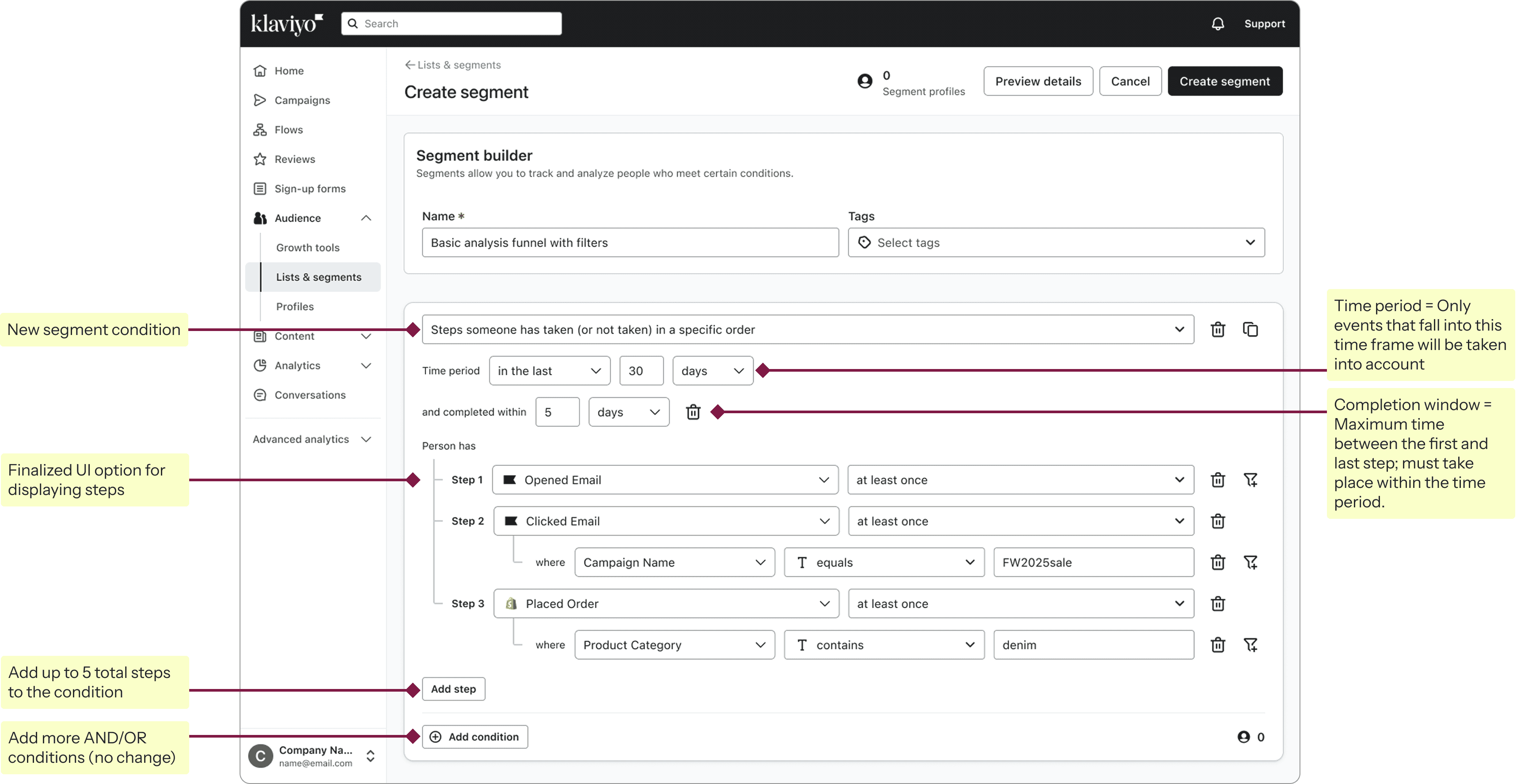
Give customers a way to build a segment condition around a series of events completed in order

Prioritize project as a top-down request from leadership, based on requests from multiple high-profile customers

How: Requirements

Each segment can only include one funnel condition (timelines, engineering constraints)

Each segment can include only one funnel condition (timelines, engineering constraint)

Funnel condition must include at least 2 steps, and no more than 5 steps

Funnel condition can be used alongside other conditions using AND/OR joiners

Support a "did not do" step, but only as the last step in the sequence (engineering constraint)

Research: Initial exploration

Research: Initial exploration

I conducted a competitor analysis across 4 platforms to understand how they approached step display and functionality, along with time period handling for funnel completion. The findings helped establish a clear direction for initial design exploration.

I conducted a competitor analysis across 4 platforms to understand how they approached step display and functionality, along with time period handling for funnel completion. The findings helped establish a clear direction for initial design exploration.

Competitor analysis takeaways

Positioning time period at the top makes it easy to locate and indicates that it relates to the entire funnel

Reduce information overload with white space and the inclusion of necessary info only

Condition language should be simple, clear, and logical to the user

Drag/drop functionality to re-order steps would be nice to have

Initial exploration: Step options

I looked at different ways to represent sequencing, aiming for something intuitive and easy to understand. I considered clarity, how well each option would translate into other languages, and how much horizontal space it took up on the page.

I looked at different ways to represent sequencing, aiming for something intuitive and easy to understand. I considered clarity, how well each option would translate into other languages, and how much horizontal space it took up on the page.

Steps

Pros

  • Clear step progression

  • Easy to understand

Cons

  • Takes up horizontal space

  • Other languages? (i18n)

Numbers

Pros

  • Clear step progression

  • Easy to understand

  • Translates easily (i18n)

Cons

  • New/custom component

and then

Pros

  • Doesn’t take up horizontal space

Cons

  • Indent is harder to follow

  • Translation issues (i18n)

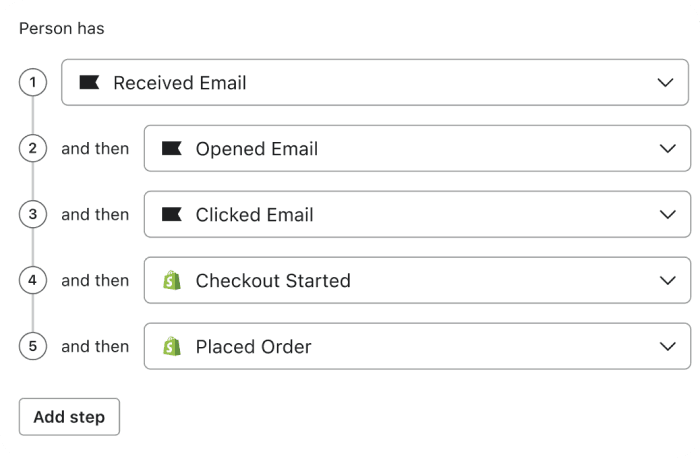
Numbers + and then
Pros

  • Clear step progression

Cons

  • New/custom component

  • Takes up horizontal space

  • Translation issues (i18n)

Initial exploration: Time period + Completion window

Initial exploration: Time period + Completion window

Time period and completion window are related but distinct concepts. I designed both states to show what each one controls and how they work together, so customers wouldn't have to reconcile two separate settings on their own.

Time period and completion window are related but distinct concepts. I designed both states to show what each one controls and how they work together, so customers wouldn't have to reconcile two separate settings on their own.

Default state

  • Time period = Only events that happened within this time frame are eligible

  • Additional dropdown options available (e.g. before/after a date, between dates/amounts, at least, or over all time)

  • Completion window is optional/hidden to lessen cognitive overload

Completion window added

  • Completion window = the maximum time between the first and last step, and must take place within the time period

  • Defaults to match the time period, so customers don’t have to reconcile them

Research: User testing

Research: User testing

I partnered with my product manager to interview 8 customers before finalizing the design. We needed to validate terminology and structure, since the concept of event funnels was new to the segment builder and could easily be misread.

I partnered with my product manager to interview 8 customers before finalizing the design. We needed to validate terminology and structure, since the concept of event funnels was new to the segment builder and could easily be misread.

We explored 3 things:

We explored 3 things:

  • Which dropdown language was clearest

  • Which step display option was easiest to understand

  • How customers interpreted "time period" and "completion window," and how we might reduce confusion between them

Results and takeaways

Across all three areas tested, customers consistently favored the clearest, most visible option. Bolded options below are what customers preferred and what we moved forward with.

Across all three areas tested, customers consistently favored the clearest, most visible option. Bolded options below are what customers preferred and what we moved forward with.

Dropdown options

  • Events in a specific order

  • Steps someone has taken (or not taken) in a specific order

  • Events in order of what someone has done

  • A funnel of events someone has done (or not done)

  • Events in a specific order

  • Steps someone has taken (or not taken) in a specific order

  • Events in order of what someone has done

  • A funnel of events someone has done (or not done)

Step options

  • Steps (Step 1, Step 2, etc.)

  • Numbers

  • and then

  • Steps (Step 1, Step 2, etc.)

  • Numbers

  • and then

Time period / Completion window

  • Placement above the segment condition made the most sense

    • Clear that it relates to the whole funnel

    • Placement below was harder to notice/find

  • Placement above the segment condition made the most sense

    • Clear that it relates to the whole funnel

    • Placement below was harder to notice/find

  • Terminology

    • Time period was clear to all users

    • Tooltip was helpful to clarify "Completion window"

    • When completion window was included, the clearest language was "and completed within"

  • Terminology

    • Time period was clear to all users

    • Tooltip was helpful to clarify "Completion window"

    • When completion window was included, the clearest language was "and completed within"

Solution

Solution

With the release of the new segment condition, we enabled marketers to build ordered funnels with up to 5 steps and customize the time period, completion window, and filters. This makes it possible to personalize messaging and target specific customer behavior.

With the release of the new segment condition, we enabled marketers to build ordered funnels with up to 5 steps and customize the time period, completion window, and filters. This makes it possible to personalize messaging and target specific customer behavior.

Try out the prototype to see how it all comes together, from condition selection through the creation of a full multi-step funnel.

Try out the prototype to see how it all comes together, from condition selection through the creation of a full multi-step funnel.

Outcomes and customer feedback

Outcomes and customer feedback

  • Released to all accounts for a 30-day free trial

  • Full, permanent access for premium users with paid access to Advanced Marketing Analytics

Continuous increase in usage and adoption

30 days = 5% usage

30 days = 5% usage

45 days = 8% usage

45 days = 8% usage

60 days = 14% usage

60 days = 14% usage

Increase in account upgrades to maintain access

30 days = N/A

30 days = N/A

45 days = 3% conversion

45 days = 3% conversion

60 days = 5% conversion

60 days = 5% conversion

Shortly after its release, a Klaviyo power user posted publicly about the feature. The post described using it for the exact kind of ordered-event use case it was built for, and drew engagement and positive feedback from several other marketers.

Reflections and takeaways

Reflections and takeaways

Familiarity builds trust

Testing language and structure with customers grounded our design decisions, cutting down on internal debate over wording. It also made the feature more intuitive and easier for customers to adopt.

Scope is a series of tradeoffs

Initially limiting the number of steps and forgoing add-ons like re-ordering functionality were necessary to meet deadlines. In the end, prioritizing a strong but simpler v1 over a more flexible, harder-to-build version meant providing customers a solid foundation.

Communication fosters alignment

Consistent check-ins and intentional group decision-making kept design, engineering, and product aligned. When in doubt, we returned to customer data to reach a consensus.