Helping customers solve their problems in half the time

Helping customers solve their problems in half the time

Helping customers solve their problems in half the time

The challenge: Disorganized information overload

The challenge: Disorganized information overload

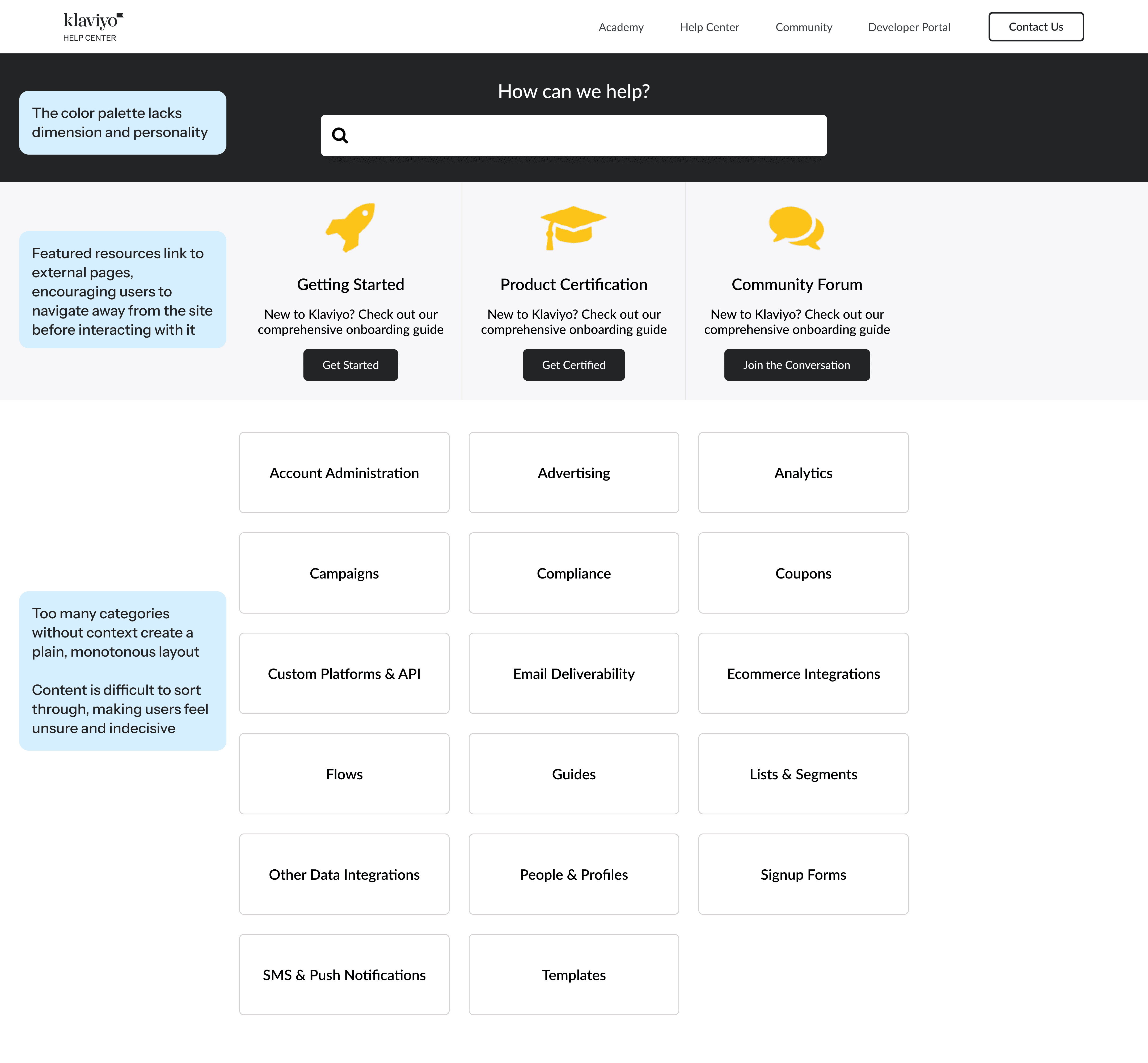
Imagine you're new to Klaviyo and you've run into an issue. You open the Help Center, hoping to find a quick answer. Instead, you're met with a vague set of category cards:

Imagine you're new to Klaviyo and you've run into an issue. You open the Help Center, hoping to find a quick answer. Instead, you're met with a vague set of category cards:

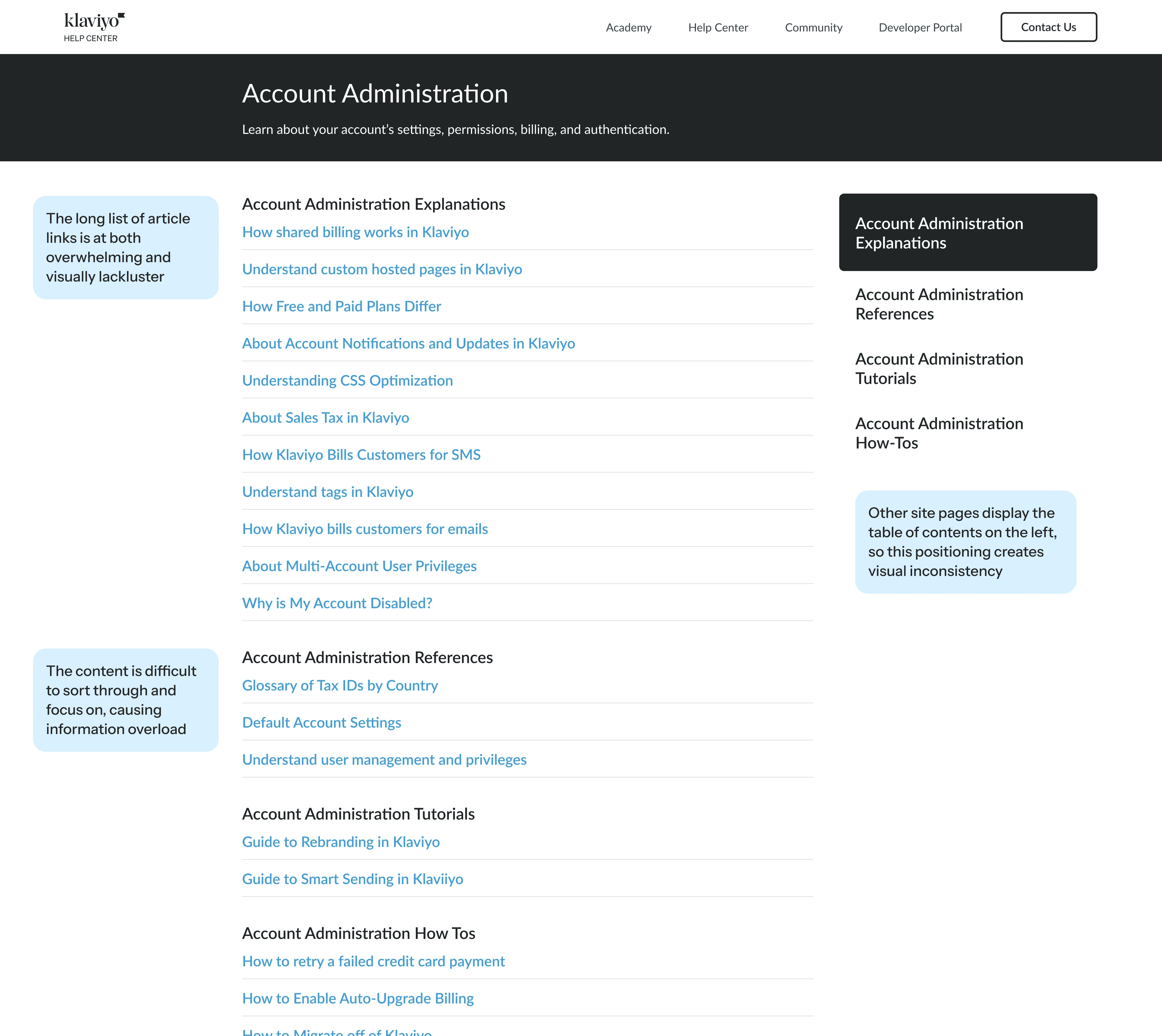
No category clearly matches your issue, so you choose what seems like the closest one. The next page is a long list of article links with no guidance on where to start.

No category clearly matches your issue, so you choose what seems like the closest one. The next page is a long list of article links with no guidance on where to start.

You skim titles, open an article link, backtrack, and repeat. Eventually you give up, and decide to Google the issue or contact Klaviyo support. This was a common experience for many Klaviyo customers.

You skim titles, open an article link, backtrack, and repeat. Eventually you give up, and decide to Google the issue or contact Klaviyo support. This was a common experience for many Klaviyo customers.

Klaviyo has over 1,500 support articles, but a lack of organization, discoverability, and consistency made it difficult for users to find answers. This resulted in unnecessary support requests and frustrated customers leaving without solutions.

Klaviyo has over 1,500 support articles, but a lack of organization, discoverability, and consistency made it difficult for users to find answers. This resulted in unnecessary support requests and customers who left without the help they needed.

Goals: Simplify, restructure, organize

Goals: Simplify, restructure, organize

Meeting our business goals started with meeting our customers' needs. This project had to deliver for both.

Meeting our business goals started with meeting our customers' needs. This project had to deliver for both.

Customer needs

Find relevant help resources quickly

Find relevant help resources quickly

Solve problems independently with confidence

Solve problems independently with confidence

Leverage Klaviyo to gain strategic insights and increase revenue

Leverage Klaviyo to gain strategic insights and increase revenue

Business goals

Improve navigation and content accessibility

Improve navigation and content accessibility

Provide clear, efficient guidelines and solutions

Provide clear, efficient guidelines and solutions

Reduce non-urgent support tickets and support overhead costs

Reduce non-urgent support tickets and support overhead costs

My role and process

My role and process

I led design, and collaborated closely with 4 engineers, a project coordinator, a content designer, and 3 customer education stakeholders. Over 8 weeks, the project moved back and forth through a robust design process:

I led design, and collaborated closely with 4 engineers, a project coordinator, a content designer, and 3 customer education stakeholders. Over 8 weeks, the project moved back and forth through a robust design process:

Discover

Discover

user interviews

current site audit
competitor analysis

Define

Define

problem definition

user flow mapping

data synthesis

Design

Design

wireframe ideation

iterative mockups
interactive prototypes

Deliver

Deliver

finalize content

accessibility check

engineering handoff

We also received feedback from many sources at constant intervals:

We also received feedback from many sources at constant intervals:

6 rounds of design iterations and review with product, engineering, and stakeholders

3 review rounds with design leadership

2 rounds of user testing

2 rounds of peer design feedback

2 UI/branding working sessions with the marketing design team

1 review session with the CEO

Solution

Solution

Home page

Home page

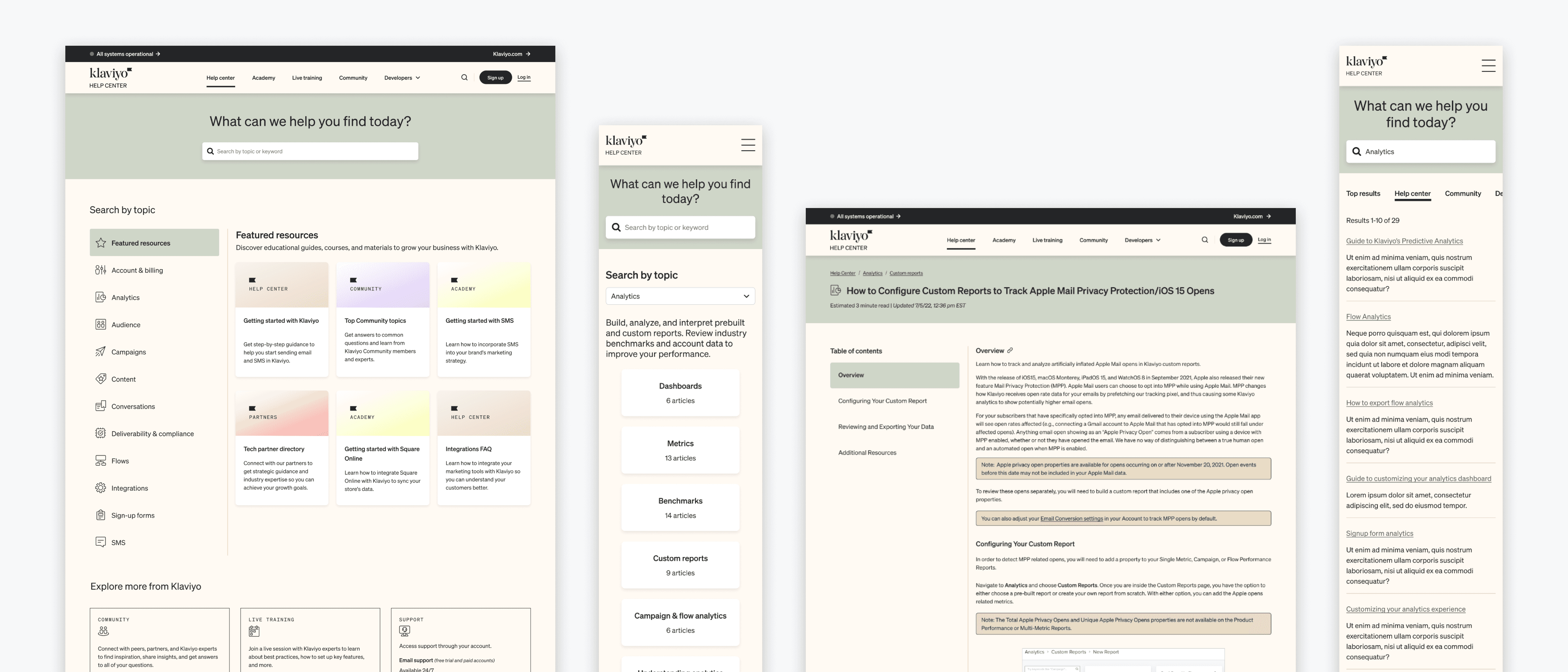
The home page was restructured to orient users so they could quickly and confidently find what they need.

The home page was restructured to orient users so they could quickly and confidently find what they need.

Persistent left navigation anchors every page across the site, giving users a point of orientation, and clear categories that mirror the areas in the Klaviyo app

Featured resource cards provide distinct, relevant sections with simple descriptions

Links to community, live training, and support are located at the bottom throughout the site, keeping them accessible without distracting from the main documentation

The updated color palette creates cohesion with Klaviyo's marketing site branding

Secondary pages

Secondary pages

Secondary pages were redesigned to progressively reveal content, allowing users to focus on what's most relevant without feeling overwhelmed.

Secondary pages were redesigned to progressively reveal content, allowing users to focus on what's most relevant without feeling overwhelmed.

Progressive disclosure lets users drill down at their own pace, processing only the info most relevant to them at each step

Selecting a category from the left navigation displays a corresponding short description, along with sub-categories and top articles

Once a sub-category is selected, articles are organized under clear, descriptive headers for easy scanning

Breadcrumb navigation orients users so they can move freely between intermediate pages without losing their place

Articles

Articles

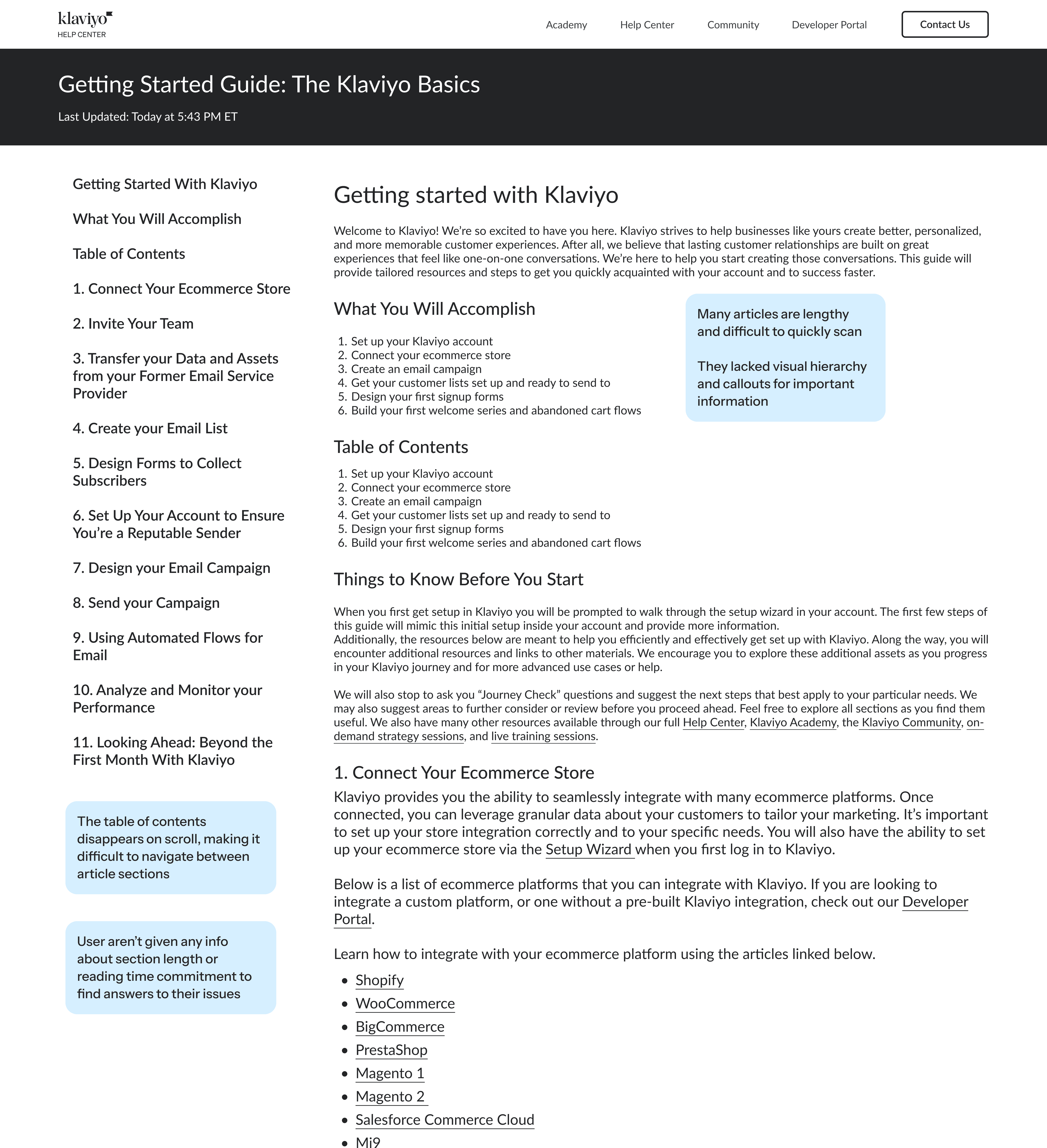
Article pages were overhauled to make content easier to navigate and trust.

Article pages were overhauled to make content easier to navigate and trust.

A new header bar provides breadcrumb navigation for orientation, an estimated read time so users know their commitment upfront, and a last-updated timestamp so they know the info is current

The table of contents is fixed on scroll, so users can always see and jump to any section from wherever they are on the page

Text styles were updated to improve visual hierarchy and scannability

Stylized callout blocks were added to surface important info that might otherwise be easy to miss

The redesign launched in the fall of 2023. Since then, the UI has been updated to reflect Klaviyo's evolving brand identity, but the layout, structure, and user experience have remained largely unchanged for nearly 3 years. That longevity is a testament to how well our original changes resonated with customers, and continue to do so today.

The redesign launched in the fall of 2023. Since then, the UI has been updated to reflect Klaviyo's evolving brand identity, but the layout, structure, and user experience have remained largely unchanged for nearly 3 years. That longevity is a testament to how well our original changes resonated with customers, and continue to do so today.

Outcomes

Outcomes

The results were significant across every metric we tracked.

Time spent on navigation pages

Time spent on navigation pages

decreased by 81%

from 1:35 to just 27 seconds

from 1:35 to just 27 seconds

Meaning: Users could get straight to what they need.

Users navigated from homepage to article

Users navigated from homepage to article

nearly 2x as often

journey completion jumped from 29% to 51%

journey completion jumped from 29% to 51%

Meaning: Users are following the path we designed for them.

Users are able to find answers

Users are able to find answers

65% faster

average read time dropped from 7:42 to 4:10

average read time dropped from 7:42 to 4:10

Meaning: Users spent less time searching and more time getting answers.

Exit rates on section pages

Exit rates on section pages

decreased by 2/3

dropping from 49% to 17%

dropping from 49% to 17%

Meaning: Users are browsing and clicking through instead of bouncing.

Reflections and next steps

Reflections and next steps

This project reinforced the degree to which information architecture shapes user confidence. The resources were always there, customers just had difficulty finding them. Given more time, I would have invested in additional rounds of user testing earlier in the process, and explored more options for the homepage category structure before converging.

This project reinforced the degree to which information architecture shapes user confidence. The resources were always there, customers just had difficulty finding them. Given more time, I would have invested in additional rounds of user testing earlier in the process, and explored more options for the homepage category structure before converging.

After the redesign, we've made a couple of important updates: We introduced an AI overview to every help article, a short summary that tells users what to expect before they commit to reading; and we added a user feedback form to continue learning from our customers and meeting their needs. Both are natural extensions of the same goal: Getting customers to solutions faster and with more confidence.

After the redesign, we've made a couple of important updates: We introduced an AI overview to every help article, a short summary that tells users what to expect before they commit to reading; and we added a user feedback form to continue learning from our customers and meeting their needs. Both are natural extensions of the same goal: Getting customers to solutions faster and with more confidence.